
Last Updated on 2024年1月30日
Pythonでデスクトップストップウォッチを作成する方法
Python初心者でも作れるストップウォッチです。
Python3エンジニア認定試験の勉強をしていて、解答タイムを計りたくなったので作りました!
https://cbt.odyssey-com.co.jp/pythonic-exam/index.html
はじめに
Pythonはその多様性と使いやすさで知られていますが、GUIアプリケーションの作成にも優れています。今日は、PythonのTkinterライブラリを使用して、シンプルながら機能的なデスクトップストップウォッチを作成する方法をご紹介します。
ストップウォッチの機能
作成するストップウォッチは、スタート、ストップ、リセットの機能を持ち、現在の経過時間を表示する最も基本的な機能です。
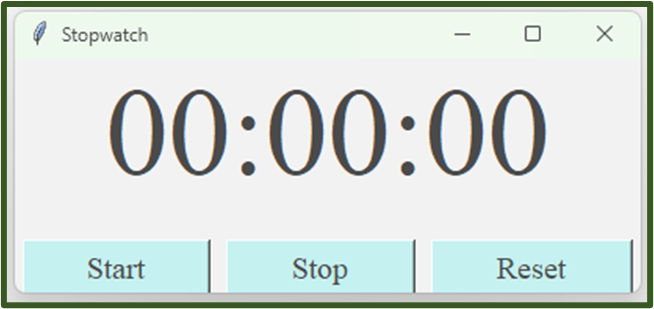
使用する技術
- Python: プログラミング言語
(Pythonは公式サイトからダウンロードしてインストールできます。) - Tkinter: Pythonの標準GUIツールキット
(Pythonと一緒にインストールされるため、追加のインストールは必要ありません。) - timeモジュール: 時間計測に使用
(Pythonの標準ライブラリの一部で、別途インストールの必要はありません。)
以下は、ストップウォッチを作成するためのPythonスクリプトです。
ストップウォッチのコード
|
1 2 3 4 5 6 7 8 9 10 11 12 13 14 15 16 17 18 19 20 21 22 23 24 25 26 27 28 29 30 31 32 33 34 35 36 37 38 39 40 41 42 43 44 45 46 47 48 49 50 51 52 53 54 55 56 57 58 59 60 61 62 63 64 65 66 |
import tkinter import time class Stopwatch: def __init__(self, root): self.root = root self.root.geometry("400x150") # ウィンドウのサイズ設定 self.root.title("Stopwatch") self.root.attributes('-topmost', True) self.root.attributes('-alpha', 0.7) self.label = tkinter.Label(font=("Times New Roman", 60)) self.label.grid(row=0, column=0, columnspan=3, sticky='ew') # 中央配置 self.start_time = 0 self.elapsed_time = 0 self.running = False # ボタンのフォントサイズを設定 button_font = ("Times New Roman", 15) # ボタンを配置 start_button = tkinter.Button(root, text='Start', command=self.start, font=button_font, bg='#AFEEEE') start_button.grid(row=1, column=0, padx=5, pady=20, sticky='nsew') stop_button = tkinter.Button(root, text='Stop', command=self.stop, font=button_font, bg='#AFEEEE') stop_button.grid(row=1, column=1, padx=5, pady=20, sticky='nsew') reset_button = tkinter.Button(root, text='Reset', command=self.reset, font=button_font, bg='#AFEEEE') reset_button.grid(row=1, column=2, padx=5, pady=20, sticky='nsew') # 3列すべてにweightを設定して、ウィジェットが均等にスペースを占めるようにする self.root.grid_columnconfigure(0, weight=1) self.root.grid_columnconfigure(1, weight=1) self.root.grid_columnconfigure(2, weight=1) self.update_label() def update_label(self): if self.running: self.elapsed_time = time.time() - self.start_time formatted_time = "{0:02}:{1:02}:{2:02}".format(int(self.elapsed_time // 3600), int((self.elapsed_time % 3600) // 60), int(self.elapsed_time % 60)) self.label["text"] = formatted_time self.root.after(1000, self.update_label) def start(self): if not self.running: self.start_time = time.time() - self.elapsed_time self.running = True self.update_label() def stop(self): if self.running: self.root.after_cancel(self.update_label) self.elapsed_time = time.time() - self.start_time self.running = False self.update_label() def reset(self): self.start_time = 0 self.elapsed_time = 0 self.running = False self.update_label() root = tkinter.Tk() stopwatch = Stopwatch(root) root.mainloop() |
コメント